Tree Information
The Tree Information card sits at the top and is always visible. It gives you a summary of the tree that's currently loaded.
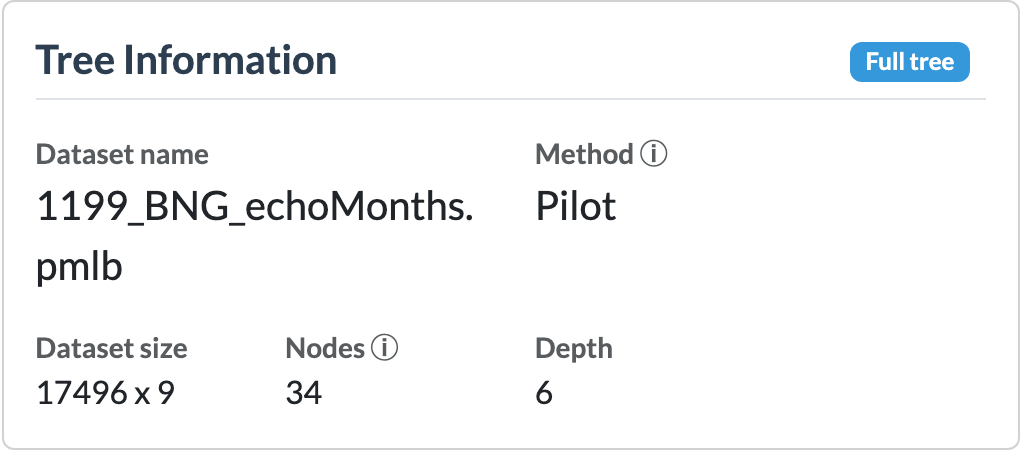
What it shows
Next to the title, the card displays several status badges that provide information about the currently displayed tree:
- Tree view – Indicates whether you are viewing: the full tree, a pruned tree, or a subtree rooted at an internal node.
- Collapsed nodes – Indicates how many nodes are collapsed in the tree, nodes that are collapsed are visually different.
- Highlighted point – Indicates whether a data point is currently highlighted.
Below the badges, the following information is shown:
- Dataset name – The name of the dataset used to fit the tree.
- Method – The algorithm used to fit the tree. On a hover it also shows:
- Max depth – The maximum model depth of the tree.
- Max model depth – The maximum model depth of the tree without counting the linear models (PILOT only).
- Training time – The time required to fit the tree.
- Min samples split – The minimum number of training samples a node must contain before it is allowed to be considered for splitting.
- Min samples leaf – The minimum number of training samples that each leaf must contain. A split is only performed if both resulting child nodes satisfy this constraint.
- Dataset size the number of rows and the number of features in the training dataset.
- Nodes The number of total nodes in the tree, On a hover it also shows the split up into the number of leaf nodes and internal nodes.
- Depth The total depth of the tree (including linear nodes for the PILOT algorithm.) The root node is at depth 0.
When it updates
The card refreshes automatically whenever a new tree is fit, saved, or loaded via the New Tree card.